
It’s important to use swift for error handling in your structs. I’m going to show you how to do this with enums. I’m excited because I really do like enums, I think they’re very powerful and you should be using them in your code. I’m going to refactor the BankAccount struct with new logic. I previously covered guard in this tutorial: Swift Guard vs If: Why the “Bouncer” Beats the “Pyramid”.
enum BankError: Error {
    case invalidAmount
    case insufficientFunds(missingAmount: Double)
}
Lets unpack this enum. We create an enum named BankError and conform to the Error protocol. Once we’re conformed to that protocol we get to use this code with throws which makes BankError a throwable object. Now we can do what’s called throw an error then integrate do-try-catch block.
I know this sounds super complicated but as I break it down, you’ll be using this all the time. Once you learn this, handling errors becomes trivial.
Each case inside the enum is a value that it represents and what’s cool is that we can pass data in a case so missingAmount will be data that we can access in our catch block.
Instead of using print statements to print out the error we’re going to throw an error.
mutating func withdraw(amount: Double){

guard amount > 0 else {

throw BankError.invalidAmount

}
guard balance >= amount else {

print("Insufficient funds")
return}

balance -= amount
print("Success! Remaining balance: \(balance)")

}
After you write throw BankError.invlaidAmount, xcode screams!
Error is not handled because the enclosing function is not declared ‘throws’
In order for a function to throw an error it has to be declared as function that will throw an error with throws.
Add throws before the opening curly brace.
mutating func withdraw(amount: Double) throws { }
After you fix this error you will get another error when you try to withdraw money.
Call can throw but is not marked with ‘try’
In order to call a function that throws an error, you have to DO something, Try something that throws an error, and Catch something. Before I show you do-try-catch and how to handle the error we need to finish throwing an error on insufficient funds.
If the amount that we’re going to withdraw is more than the balance in our account then we need to calculate the difference, throw the error while passing the difference to the enum.
mutating func withdraw(amount: Double) throws {

guard amount > 0 else {
    throw BankError.invalidAmount

}
guard balance >= amount else {

//calculate how the difference between withdrawal amount vs balance
 let balanceShortBy = amount - balance

//pas data to enum while throwing an error
 throw BankError.insufficientFunds(missingAmount: balanceShortBy)

}

balance -= amount
print("Success! Remaining balance: \(balance)")

}
What’s nice about swift is that if you misspell a constant name you’ll get an error
Cannot find ‘balanceShortBy’ in scope. My constant, which is declared using let and can’t change was : balnceShortBy
As your calling a function you can see if it throws an error by the word throws that we added to the function earlier.
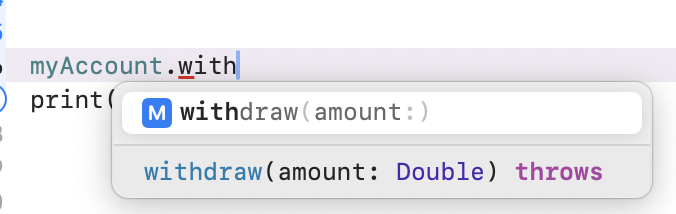
Do-Try-Catch
Now lets try to withdraw money and handle the errors using catch
You might be thinking to yourself, if we’re going to put a print statement in the catch then what is the purpose of writing all of this code when we could have just done it in the withdraw function. I understand your concern because I had the same thoughts until I learned that do-try-catch is cleaner and allows you to provide UI feedback in the catch block.
Well, couldn’t you provide UI feedback in the original function instead of writing all of this extra code. YES, but it’s very messy and if you’re thinking of being a professional app developer then clean code wins everyday but more importantly, you don’t want to marry your function to the UI. If this function is tied to a specific view showing an error popup then it would be impossible to use BankAccount logic in other areas of your app where you wouldn’t want that same popup.
Using do-try-catch allows you to manage a growing app more efficiently.
Before I show you code, there is a warning you will get if you forgot to remove return after throwing an arrow. Code after ‘throw’ will never be executed
This means that any line of code after throws won’t run so just remove it.
var myAccount = BankAccount(owner: "Jim", balance: 200.0)

myAccount.depositIntoAccount(amount: 20)
print(myAccount.balance)

do {
  try myAccount.withdraw(amount: 1200)

} catch BankError.invalidAmount {

    print("Please enter a positive amount")


} catch BankError.insufficientFunds(missingAmount: let amountNeeded){


    print("Insufficent Funds: You need \(amountNeeded) to complete the withdrawal")

} catch {

    print("Unexpected error")
}


print(myAccount.balance)
So we wrap our function that throws an error around do{ } then inside do we write try
before the function that throws.
Now we can use catch on BankError.case so for instance BankError.invalidAmount. In each catch enum { } block we can do something so you can show something on screen instead of a print statement.
Look closely to how we access the variable that’s passed when we throw an error in the withdrawal function. When we catch the enum we use let amountNeeded to store the value
and then use it in our print statement inside of \( ). amountNeeded was defined as a double earlier.
Below is the source code
enum BankError: Error {
    case invalidAmount
    case insufficientFunds(missingAmount: Double)
}


struct BankAccount {

var owner:String
private(set) var balance:Double

mutating func depositIntoAccount(amount: Double){

 balance += amount


}

mutating func withdraw(amount: Double) throws {

guard amount > 0 else {
    throw BankError.invalidAmount

}
guard balance >= amount else {

    let balanceShortBy = amount - balance
    throw BankError.insufficientFunds(missingAmount: balanceShortBy)
}

balance -= amount
print("Success! Remaining balance: \(balance)")

}


}


var myAccount = BankAccount(owner: "Jim", balance: 200.0)

myAccount.depositIntoAccount(amount: 20)
print(myAccount.balance)

do {
  try myAccount.withdraw(amount: 1200)

} catch BankError.invalidAmount {

    print("Please enter a positive amount")


} catch BankError.insufficientFunds(missingAmount: let amountNeeded){


    print("Insufficient Funds: You need \(amountNeeded) to complete the withdrawal")

} catch {

    print("Unexpected error")
}


print(myAccount.balance)
I tried to withdraw $1,200 dollars and received the error below
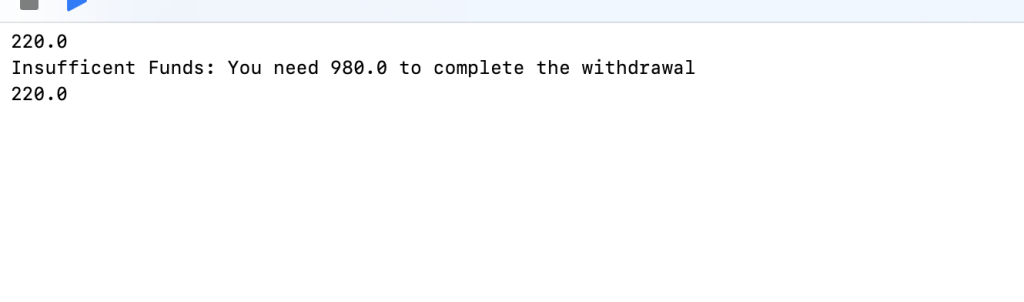
Now that you know how to handle errors, your code will be much more professional and reusable but if you want to learn more about error handling I put my notes together in another post here When to use Swift Result Type vs Throws (and why it matters)
This is part of my daily Swift notes on writing safer, more predictable code.
Master Swift, One Tip a Day
Join other developers getting one bite-sized Swift lesson delivered to their inbox every morning.
Pingback: Swift Guard vs If: Why the “Bouncer” Beats the “Pyramid” – Swift Owls
Pingback: When to use Swift Result Type vs Throws (and why it matters) – Swift Owls